John HenryNewman Academy

Parent Apps
At John Henry Newman Academy, keeping in touch with parents is very important to us. Whether this is a short conversation with a class teacher at the classroom door, a longer message or updates on how your child is doing and what they have achieved. We have a number of ways to keep in touch and we are constantly updating these.
If you have any issues logging on, or signing up – please get in touch with the school office and they will guide you through the process of setting it up.
Phone number: 01865 772495
Email address: office.2000@jhnacademy.co.uk
My Child At School
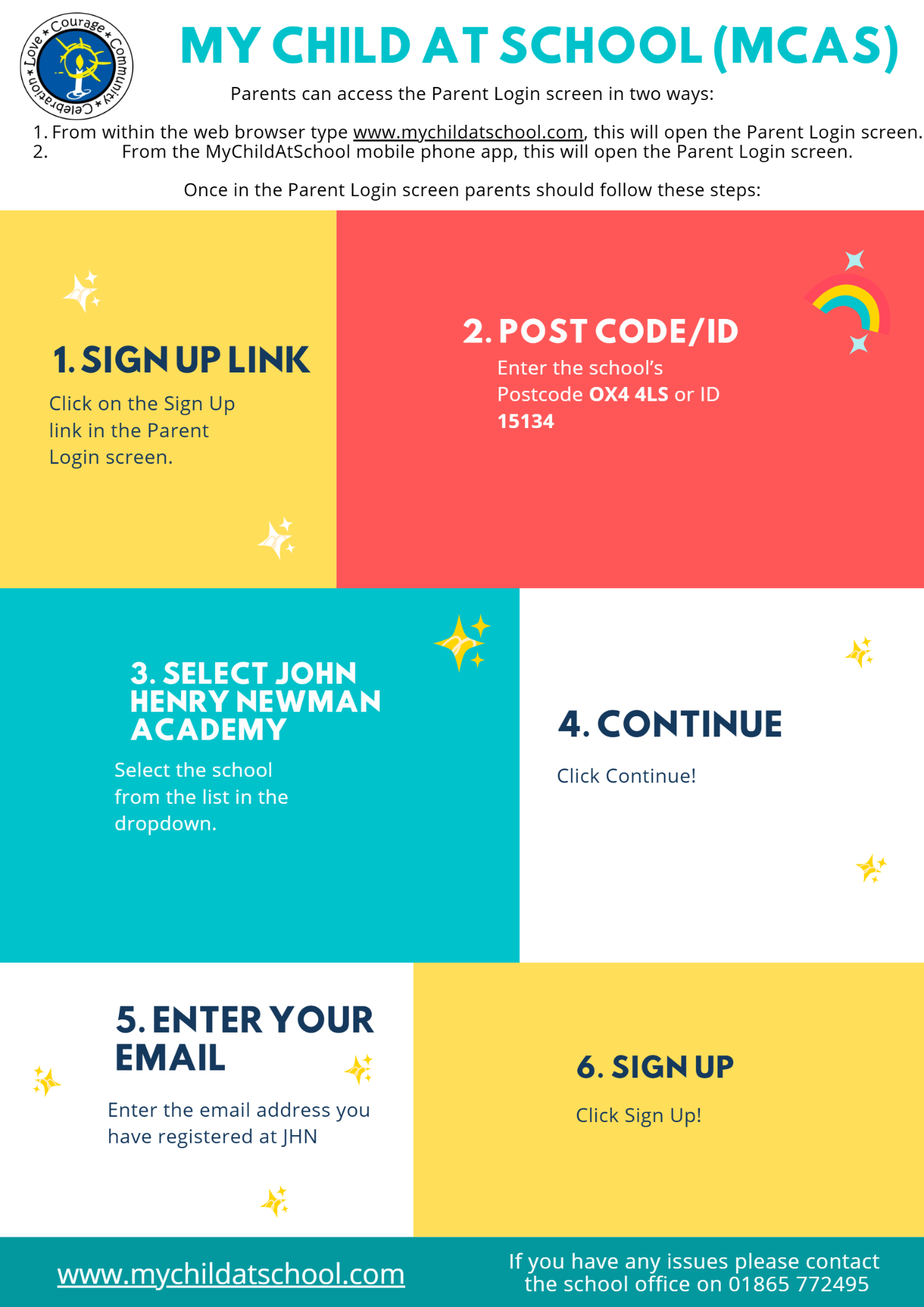
MCAS is our parent communication and payment portal. It is available via a web browser and in the form of an app on both Android and Apple devices. We use this system to provide you with essential information and regular updates about your child(ren) and their life at John Henry Newman Academy.
You can use the links below to download the app:
What is the web address for MCAS?
This link will take you to the MCAS Page:
https://www.mychildatschool.com
How do I sign up?
I’ve forgotten my email
If you would like to confirm the e-mail address that the school has on record for you, please contact office.2000@jhnacademy.co.uk
I’ve forgotten my password
Visit the site below to reset your password.
https://www.mychildatschool.com/MCAS/MCSForgottenLogin
Why does the page shake when signing up?
Your password might not match the requirements. Please make sure that the password you are entering is at least 8 characters long and includes uppercase letters, lowercase letters, numbers and special characters.
How do I change details on MCAS?
Using the Data Collection Form on MCAS you can edit, delete and add selected details of our children’s and your personal details.
Addresses, Email Address, Mobile Numbers etc.
Some details such as Legal Name cannot be changed on MCAS. Please email your year team in the first instance, and if we need further details such as supporting documents, we will let you know.
Any amendments will first be approved by Highlands School administration staff before any records are permanently updated. Amendments that are not approved will revert to their original state. There may be a delay in approval, and we may contact you if we need clarification on details.
What if I have more than one child attending JHN?
If you have more than one child at the school, you are able to click on the name of the student next to their photograph, and it will give you the option to select other students associated with the user. Click on the photograph or the text to change the views, allowing information to be viewed with just one login.
Tapestry
At JHN we use Tapestry as our main method of sharing exciting news, picture of high quality work or educational visits and notices from class teachers. Tapestry is able to provide each individual child with an online Learning Journal held online. Parents and carers are given their own log-in using their email.
All our staff are given a secure log-in. They can then upload observations, photos or videos; recording children’s achievements and assessing their learning in reference to the EYFS, Keys Stage 1 and Key Stage 2 curriculum. Once added to Tapestry, an email is automatically generated to parents/carers so that they are able set up to that child’s account and they are informed whenever an observation has been added so they can have a look and add any of their own comments to it.
Parents/carers can also add their own observations of their child to share progress and milestones at home. To find out more about how Tapestry works, please click here.
Make sure you are signed up so that you can keep updated with all of the exciting activities your child gets up to on their JHN adventure. We would love to see posts of what you get up to at home so make sure you pop on a picture or send us a message there too!